Sign Android Application and Publish on Google Play
Android Android Programming ProgrammingCongrats!! You have completed your android project and going to publish app on Google Play. Before publishing app, check all functions properly and test your app accurately. After testing of your app, you have to sign your app for publishing on Google Play. Step for signing android app is given below:-
1. First of all, Right click on your project -> Android Tools -> Export Unsigned Android Application -> Save APK file.
If you got any error, simply go to workspace log and press on red button & permanently delete error(s).
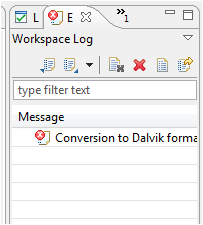
Remove Error(s)
1. First of all, Right click on your project -> Android Tools -> Export Unsigned Android Application -> Save APK file.
If you got any error, simply go to workspace log and press on red button & permanently delete error(s).
Remove Error(s)
Extract source code (Java and XML) from Android APK File
Android ProgrammingNot getting any idea how to make good layout in Android activity or not getting how any application doing that things which you want in your project but you don’t know how to implement it in your APK File. So, I came here with new technology & new thinking which can make you crazy in android world.
Now time for backtracking…start your time to do hacking. Do you know you can get source code of Android APK file? Time to break the code..Let’s learn step by step.
In this tutorial we will learn how to convert android APK file into source code. Android .apk file is a compressed form of a file which contains Java classes (in .dex form), XML files and all necessary files. So first we will learn how to get Java source File from android apk using dex2jar and Java decompiler tools and then we will learn how to get XML source file using apktool and apkinstall tools.
To get the source code from APK file, we will need these tools:
1. dex2jar
2. java decompiler
3. apktool
4. apkinstall
Now time for backtracking…start your time to do hacking. Do you know you can get source code of Android APK file? Time to break the code..Let’s learn step by step.
In this tutorial we will learn how to convert android APK file into source code. Android .apk file is a compressed form of a file which contains Java classes (in .dex form), XML files and all necessary files. So first we will learn how to get Java source File from android apk using dex2jar and Java decompiler tools and then we will learn how to get XML source file using apktool and apkinstall tools.
To get the source code from APK file, we will need these tools:
1. dex2jar
2. java decompiler
3. apktool
4. apkinstall
Android Programming Tutorial
Android Android Programming ProgrammingAndroid is an open source and Linux-based operating system for mobile devices such as smartphones and tablet computers. Android was developed by the Open Handset Alliance, led by Google, and other companies. This tutorial will teach you basic Android programming and will also take you through some advance concepts related to Android application development.

1. What is Android?
Android Android Programming Programming1. What is Android?
Android
is an operating system based on the Linux kernel. The
project
responsible for developing the Android system is called the
Android Open Source Project
(AOSP)
and is primarily lead
by Google.
The Android system supports background processing, provides a rich user interface library, supports 2-D and 3-D graphics using the OpenGL-ES (short OpenGL) standard and grants access to the file system as well as an embedded SQLite database.
An Android application typically consists of different visual and non visual components and can reuse components of other applications.
The Android system supports background processing, provides a rich user interface library, supports 2-D and 3-D graphics using the OpenGL-ES (short OpenGL) standard and grants access to the file system as well as an embedded SQLite database.
An Android application typically consists of different visual and non visual components and can reuse components of other applications.
In Android the reuse of other application components is a concept
known
as
task. An application can access other Android components to achieve a
task.
For example, from a component of your application you can
trigger
another component in the Android system, which manages photos,
even
if
this component is not part of your application. In this
component you
select a photo and return to your application to use the
selected
photo.
Such a flow of events is depicted in the following graphic.
Such a flow of events is depicted in the following graphic.
Subscribe to:
Posts (Atom)